
How to install SAMprefs on iPhone 3G, 3GS, 4
As I wrote earlier, if you are having trouble unlocking the iPhone, or iPhone you can not be unlocked using the “ultrasn0w” please continue reading here to overcome this. The steps are almost the same as I have been posting on the Unlock iPhone 3G, 3GS iOS 4.1 - 4.2.1 with ultrasn0w
1. First you have to do is install “Cydia” on your iPhone. If you already have the “Cydia” You do not need to do it. And also make sure you’ve installed “ultrasn0w” through Cydia Apps on your iPhone.
2. Open “Cydia” - “Manage” - “Sources” - “Edit” - “Add”.
3. Add “http://repo.bingner.com/”
4. Then “Return to Cydia”, select and tap “Bingner” - “SAM” - “Install” - “Confirm”.
5. “Restart SpringBoard”, finish.

6. On the iPhone go to “Settings” scroll down, see “SAM” is already installed there. Please adjust the settings according to your taste.
Note: If get here your iPhone 3G, 3GS, 4 have not managed to unlock means there’s something you have not yet done. Or maybe you need to change modem firmware/baseband your iPhone, from 05.12.01, 05.14.01, 05.15.04, xx.xx.xx to 06.15.00 (iPad baseband). If you still insist to unlock your iPhone, please read more on Update iPhone 3G, 3GS baseband 05.12.01, 05.14.01, 05.15.04, xx.xx.xx to 06.15.00 with redsn0w 0.9.6b6. After you finish changing your iPhone baseband to baseband iPad, you can repeat it from beginning to unlock your iPhone.
...
1. First you have to do is install “Cydia” on your iPhone. If you already have the “Cydia” You do not need to do it. And also make sure you’ve installed “ultrasn0w” through Cydia Apps on your iPhone.
2. Open “Cydia” - “Manage” - “Sources” - “Edit” - “Add”.
3. Add “http://repo.bingner.com/”
4. Then “Return to Cydia”, select and tap “Bingner” - “SAM” - “Install” - “Confirm”.
5. “Restart SpringBoard”, finish.

Image 5.4.1
Note: If get here your iPhone 3G, 3GS, 4 have not managed to unlock means there’s something you have not yet done. Or maybe you need to change modem firmware/baseband your iPhone, from 05.12.01, 05.14.01, 05.15.04, xx.xx.xx to 06.15.00 (iPad baseband). If you still insist to unlock your iPhone, please read more on Update iPhone 3G, 3GS baseband 05.12.01, 05.14.01, 05.15.04, xx.xx.xx to 06.15.00 with redsn0w 0.9.6b6. After you finish changing your iPhone baseband to baseband iPad, you can repeat it from beginning to unlock your iPhone.
...
Read more≫


Japan: Jailbreak and unlock iPhone 3G, 3GS, 4 firmware 4.2.1 with redsn0w 0.9.6b6
1. Preparation:
- Connect iPhone to the computer.
- Download redsn0w 0.9.6b6
- Download iPhone firmware (your iPhone current firmware). Or you can download from this link: http://www.felixbruns.de/iPod/firmware/
2. Open “redsn0w 0.9.6b6”
3. “Browse” and enter iPhone firmware *ipsw file, "Open".
4. After successfully click “Next” and check “Install Cydia Apps”, “Battery percentage” - “Next”. You also can choose other features if you need.
5. Click “Next” and follow the directions on redsn0w 0.9.6b6.
6. After finishing “Done!”, click “Finish”.
7. Installing Ramdisk and pineapple image will appear on your iPhone. Wait until finished.
8. On your iPhone, open “Cydia” - “Manage” - “Code Source/Sources” - “Edit” - “Add” then enter “http://repo666.ultrasn0w.com/”, Add.
9. Your iPhone will reboot or restart automatically. Then open back the “Cydia” - “Manage” - “Package” then select “repo666.ultrasn0w” - “ultrasn0w” - “Install” - “Confirm”
10. After reboot, go back to “Cydia” - “Manage” - “Code Sourc/Sources” - “Edit” - “Add” - enter “http://repo.bingner.com/”, Add.
11. Return to Cydia, select “SAM” - “Install” - “Confirm”.
12. Now open “Setting”, tap “SAM” and select “Deactive”.
13. Unlock finished.
Note: If the SIM card that you install on the iPhone is not on, turn off the iPhone then turn on again. And if the SIM card is still not active, you may need to change your iPhone baseband to baseband iPad. Read on Update iPhone 3G, 3GS baseband 05.12.01, 05.14.01, 05.15.04, xx.xx.xx to 06.15.00 with redsn0w 0.9.6b6
...
- Connect iPhone to the computer.
- Download redsn0w 0.9.6b6
- Download iPhone firmware (your iPhone current firmware). Or you can download from this link: http://www.felixbruns.de/iPod/firmware/
2. Open “redsn0w 0.9.6b6”
3. “Browse” and enter iPhone firmware *ipsw file, "Open".
4. After successfully click “Next” and check “Install Cydia Apps”, “Battery percentage” - “Next”. You also can choose other features if you need.
5. Click “Next” and follow the directions on redsn0w 0.9.6b6.
6. After finishing “Done!”, click “Finish”.
7. Installing Ramdisk and pineapple image will appear on your iPhone. Wait until finished.
8. On your iPhone, open “Cydia” - “Manage” - “Code Source/Sources” - “Edit” - “Add” then enter “http://repo666.ultrasn0w.com/”, Add.
9. Your iPhone will reboot or restart automatically. Then open back the “Cydia” - “Manage” - “Package” then select “repo666.ultrasn0w” - “ultrasn0w” - “Install” - “Confirm”
10. After reboot, go back to “Cydia” - “Manage” - “Code Sourc/Sources” - “Edit” - “Add” - enter “http://repo.bingner.com/”, Add.
11. Return to Cydia, select “SAM” - “Install” - “Confirm”.
12. Now open “Setting”, tap “SAM” and select “Deactive”.
13. Unlock finished.
Note: If the SIM card that you install on the iPhone is not on, turn off the iPhone then turn on again. And if the SIM card is still not active, you may need to change your iPhone baseband to baseband iPad. Read on Update iPhone 3G, 3GS baseband 05.12.01, 05.14.01, 05.15.04, xx.xx.xx to 06.15.00 with redsn0w 0.9.6b6
...
Read more≫
Unlock iPhone 3G, 3GS , 4 iOS 4.0 - 4.2.1 (Japan)
As usual, this is not something that is difficult, provided you know and master how to do it. Although there are some step by step the same, but there are many different tricks. Unlock the iPhone means to make the iPhone can be used with various kinds of SIM card. In Japan, based on the information I get, the iPhone first glide on “Softbank”, and unfortunately could not be used to use cards from NTT DoCoMo, or the other. Because “Softbank” has locked the iPhone to always just be used only with SIM card from “Softbank”, it was specifically for the iPhone. Cards from any other handphone equally from “Softbank” also can not be used for the iPhone. E-mail address is different from the iPhone to other mobile phone models on Softbank. E-mail address iPhone from Softbank is ending “i.softbank.jp”. Meanwhile, E-mail address other handphone equally from Softbank is ending “softbank.ne.jp”. “i” is from the iMAP server. Maybe you also know if you are one of the users of Softbank Mobile.
If you are still living in Japan, and using the iPhone is already unlocked, several weeks after you unlock your iPhone will be detected by the Softbank. But this is not nothing, you will not be subject to penalties. Only after one week, ever since the first day notifications via SMS come your phone number, the service will be turned off. I never experienced that. Since I often tried, to the point that I forgot that my iPhone has been unlocked. Therefore, I direct a quick fix my iPhone. And everything returns to normal. Okay. Because I can still do it sometime when I need it.
After conducting several trials at once the practice, several problems can be resolved smoothly. For you who live in Japan, which has not found a way to unlock the iPhone, please follow the guidelines below. 100% work. One time may be useful if you come out of Japan, because "Softbank"can not be used all over the world, as well as others.
1. You must already have the iPhone 3G, 3GS, 4 in a state of jailbreak, especially Cydia Apps already installed on your iPhone. Or read “here”, if you do not jailbreak your iPhone.
2. Now, open the “Cydia”, then choose one of 3 choice, if I choose “Developer”.
3. Then select “Manage”.
4. Select “Sources”.
5. Tap “Edit” - “Add”, on the pop up window enter “http://repo666.ultrasn0w.com/”, then “Add Source”.
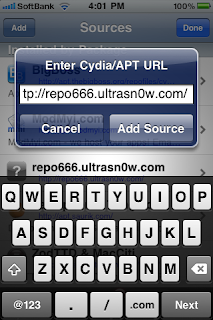
6. Tap “repo666.ultrasn0w.com”, then tap “ultrasn0w” - “Install” - “Confirm”.
7. If a message appears “Could not activate cellular data network”, tap “OK” and then “Reboot Device”.

8. Finish.
If you do it right, you will see the results work well. I’ve been practicing. And is really running as planned. Although I have sacrificed a lot of time before mastering the trick. Yes, that’s experience, for we share. From me and from you. If there is a problem with your iPhone or have not managed to unlock your iPhone, please contact me via E-mail. Or you can also give a little input in the comments box below.
Note: Always see the carrier on your iPhone. If the carrier shows “Searching ...” or “No service” means you have to install the “SAM” through “Cydia Apps” to activate your SIM. Click here to view "How to install SAMprefs pada iPhone 3G, 3GS, 4"
...
If you are still living in Japan, and using the iPhone is already unlocked, several weeks after you unlock your iPhone will be detected by the Softbank. But this is not nothing, you will not be subject to penalties. Only after one week, ever since the first day notifications via SMS come your phone number, the service will be turned off. I never experienced that. Since I often tried, to the point that I forgot that my iPhone has been unlocked. Therefore, I direct a quick fix my iPhone. And everything returns to normal. Okay. Because I can still do it sometime when I need it.
After conducting several trials at once the practice, several problems can be resolved smoothly. For you who live in Japan, which has not found a way to unlock the iPhone, please follow the guidelines below. 100% work. One time may be useful if you come out of Japan, because "Softbank"can not be used all over the world, as well as others.
1. You must already have the iPhone 3G, 3GS, 4 in a state of jailbreak, especially Cydia Apps already installed on your iPhone. Or read “here”, if you do not jailbreak your iPhone.
2. Now, open the “Cydia”, then choose one of 3 choice, if I choose “Developer”.
3. Then select “Manage”.
4. Select “Sources”.
5. Tap “Edit” - “Add”, on the pop up window enter “http://repo666.ultrasn0w.com/”, then “Add Source”.

Image 5.3.1
7. If a message appears “Could not activate cellular data network”, tap “OK” and then “Reboot Device”.

Image 5.3.2
If you do it right, you will see the results work well. I’ve been practicing. And is really running as planned. Although I have sacrificed a lot of time before mastering the trick. Yes, that’s experience, for we share. From me and from you. If there is a problem with your iPhone or have not managed to unlock your iPhone, please contact me via E-mail. Or you can also give a little input in the comments box below.
Note: Always see the carrier on your iPhone. If the carrier shows “Searching ...” or “No service” means you have to install the “SAM” through “Cydia Apps” to activate your SIM. Click here to view "How to install SAMprefs pada iPhone 3G, 3GS, 4"
...
Read more≫
Unlock iPhone 3G, 3GS iOS 4.1 - 4.2.1 with ultrasn0w
Important: Before you proceed to unlock the iPhone, the first you must have a iPhone already in a state jailbroken, including Cydia applications already installed on your iPhone. If you have not jailbroken your iPhone, please jailbreak your iPhone first. Or please read the ways to jailbreak your iPhone on the label “Jailbreak iPhone” is already listed on the side of this page. But if you and your iPhone is ready, let’s continue the next step, ie unlock the iPhone.
1. Make sure the iPhone 3G, 3GS which you will unlock it is already jailbreak.
2. Now, open the “Cydia”, then choose one of 3 choice, I choose “Developer”.
3. Then select “Manage”.
4. Select “Sources”.
5. Tap “Edit” - “Add”, on the pop up window enter “http://repo666.ultrasn0w.com/”, then “Add Source”.

6. Tap “repo666.ultrasn0w.com”, then tap “ultrasn0w” - “Install” - “Confirm”.
7. If a message appears “Could not activate cellular data network”, tap “OK” and then “Reboot Device”.

8. Once your iPhone is active again, unlock the iPhone has been completed. To make sure, try to insert another SIM card on your iPhone.
Note: See carriers on your iPhone. If the carrier shows “Searching ...” or “No service” means you have to install the “SAM” through “Cydia Apps” to activate your SIM. Click here to view "How to install SAMprefs pada iPhone 3G, 3GS, 4"
...
1. Make sure the iPhone 3G, 3GS which you will unlock it is already jailbreak.
2. Now, open the “Cydia”, then choose one of 3 choice, I choose “Developer”.
3. Then select “Manage”.
4. Select “Sources”.
5. Tap “Edit” - “Add”, on the pop up window enter “http://repo666.ultrasn0w.com/”, then “Add Source”.

Image 5.2.1
6. Tap “repo666.ultrasn0w.com”, then tap “ultrasn0w” - “Install” - “Confirm”.
7. If a message appears “Could not activate cellular data network”, tap “OK” and then “Reboot Device”.

Image 5.2.2
8. Once your iPhone is active again, unlock the iPhone has been completed. To make sure, try to insert another SIM card on your iPhone.
Note: See carriers on your iPhone. If the carrier shows “Searching ...” or “No service” means you have to install the “SAM” through “Cydia Apps” to activate your SIM. Click here to view "How to install SAMprefs pada iPhone 3G, 3GS, 4"
...
Read more≫
Unlock iPhone 3G, 3GS, 4 iOS 3.0 - 4.0.1 with ultrasn0w without computer
Gomen, it turns out "jailbreakme.com" can only be used for version 3.1.2 - 4.0.1. OK, go to the next steps. Unlock the iPhone is not an illegal act. This is a show that everyone needs the freedom to use their iPhone. But this will void your iPhone’s warranty. If you are traveling abroad, and seeing the iPhone you are active or want to use a wide range of SIM cards on your iPhone, please follow the following steps:
1. Make sure the iPhone 3G, 3GS, 4 who would you unlock already in a state of jailbreak. Or if not, please read on: How to jailbreak iPhone 3G, 3GS, 4 and iPod Touch iOS 3.1.2 - 4.0.1 with jailbreakMe.com without computer
2. Now, open the “Cydia”, then choose one of 3 choice, if I choose “Developer” (No Filters).
3. Then select “Manage”.
4. Select “Sources”.
5. Tap “Edit” - “Add”, on the pop up window enter “http://repo666.ultrasn0w.com/”, then “Add Source”.

6. “Done”, tap “repo666.ultrasn0w.com”, then tap “ultrasn0w” - “Install” - “Confirm”.

7. Look at the carrier on your iPhone. If the carrier shows “Searching ...” or “No service” let alone first. After a while, tap “Reboot Device”. And you will see there are defects in your iPhone screen. At the top right corner looks a line of colorful, I do not know what it was. That is one drawback if you unlock the iPhone without using a computer.
8. Unlock iPhone 3G, 3GS, 4 iOS 3.1.2 - 4.0.1 finished up here.
Note: Look at the carrier on your iPhone. If the carrier still shows “Searching ...”or “No service”, means you have to install the “SAM” through “Cydia Apps” to activate your SIM. Click here to view the “How to install SAMprefs on iPhone 3G, 3GS, 4”
...
1. Make sure the iPhone 3G, 3GS, 4 who would you unlock already in a state of jailbreak. Or if not, please read on: How to jailbreak iPhone 3G, 3GS, 4 and iPod Touch iOS 3.1.2 - 4.0.1 with jailbreakMe.com without computer
2. Now, open the “Cydia”, then choose one of 3 choice, if I choose “Developer” (No Filters).
3. Then select “Manage”.
4. Select “Sources”.
5. Tap “Edit” - “Add”, on the pop up window enter “http://repo666.ultrasn0w.com/”, then “Add Source”.

Image 5.1.1

Image 5.1.2
8. Unlock iPhone 3G, 3GS, 4 iOS 3.1.2 - 4.0.1 finished up here.
Note: Look at the carrier on your iPhone. If the carrier still shows “Searching ...”or “No service”, means you have to install the “SAM” through “Cydia Apps” to activate your SIM. Click here to view the “How to install SAMprefs on iPhone 3G, 3GS, 4”
...
Read more≫


